Flat Free Page
Flat Free Content
To manage content within the Lucid Flat Free page, we will be using custom widgets in page builder mode. If you are new to page builder, please read the BigCommerce documenation.
Below you will find information about the more complex widgets being used on the page and how to update them.
Extended Description
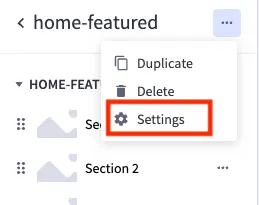
Click the three dots in the upper right corner to access the container settings. Within the settings, you will be able to update the heading color, size, and general padding.
You can add and remove entries as needed. Within each entry, you will find various inputs. Most are self-explanatory, but please contact us if you need additional information or see bugs.
Flat Free Shipping
Similar to the extended description widget, you can add and remove entries as needed. Within each entry, you will find various inputs.
Youtube Video
The youtube video requires the embed URL from youtube. To get the correct URL follow the steps below:
-
Go to youtube and click the share button on the video you wish to link
-
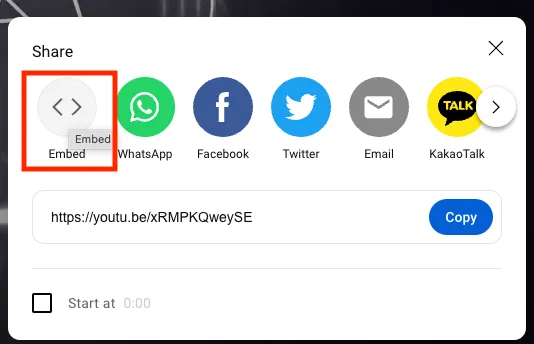
Within the share options, select “Embed”
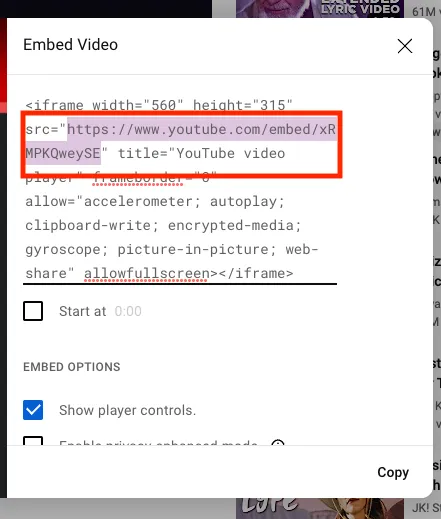
- Copy ONLY the URL from the embed code provided.
- Paste the URL into the widget input labled “Youtube Embed URL”
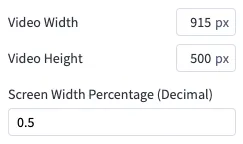
Set the max width and height you would like the video. This will help keep the same aspect ratio between sizes. Based on how large you want the video to expand, also include a Screen Width Percentage as a decimal value. If you want it to be full screen, just put 1. A max width of something like 80% of the screen would be input as 0.8.