Mattress Guide
Guide for editing and customizing each type of content on the mattress sizing guide webpage (/mattress-guide/). Note: the mattress sizing guide modals that live on mattress product pages share the same content as the dimensions widget on this page. Editing the content in the dimensions here will make edits to both locations.
Updating Basic Content
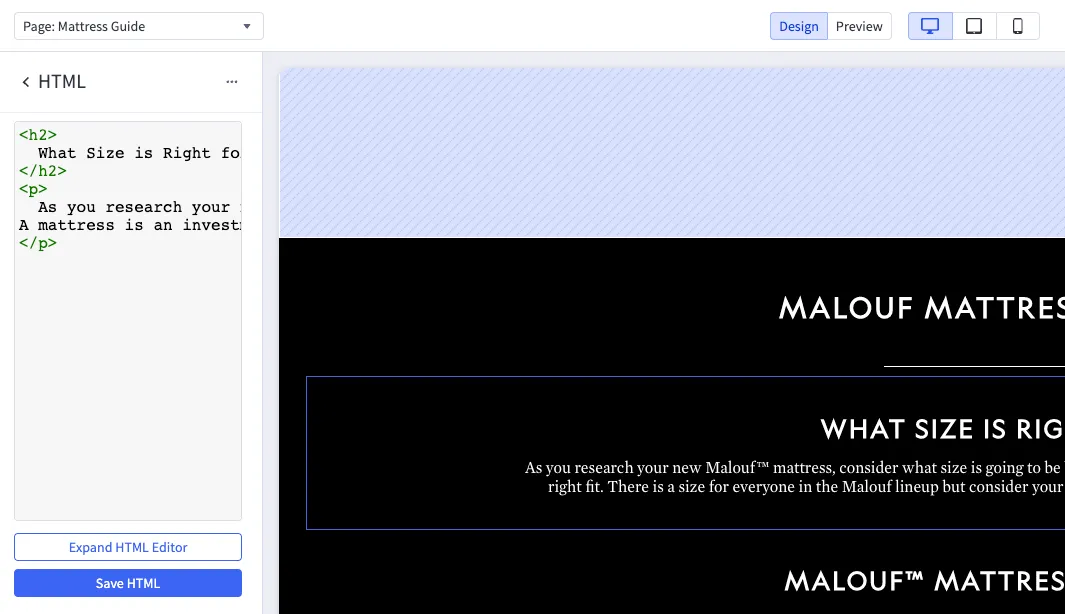
Most of the basic content for this page is inside of editable HTML blocks. To edit the content in these blocks, click on the text or image you’d like to update. The edit pane will have an “Expand HTML Editor” button that you can click on to make the window larger and see the full text. If possible, do not edit the colored characters inside these html blocks. The text between the colored tags can be changed however you’d like.
Editing the Mattress Guide Widget (Light Section)
The list in the light section on the mattress guide is one widget that you can add and remove elements from as needed. To edit this content, click anywhere on the widget to pull up the edit pane on the left.
- Select the mattress section you’d like to edit from the list, or press the ”+” to add a new mattress section.
- Replace the image link by uploading a new image to the bigcommerce image manager
- Make sure to update the dimensions field with the mattresses dimensions
- Update the description field with the block text
- Update the button link to the correct product filter
Updating the FAQ
See Category FAQ’s for how to use the FAQ widget. This widget is the same type used on category pages.